Unified Diffing: How AI Coding Agents Show Exactly What Changed
A practical guide to reading agent-generated patches, spotting scope creep, and validating code changes before they reach production.

An AI coding agent can say an edit is complete in one sentence. That sentence is not proof. Unified diffing is the part that makes the work inspectable: a compact patch showing the precise lines removed, the lines added, and enough surrounding code to judge the change in context.
This matters because a confident completion message can hide a wrong file, an unnecessary rewrite, or a subtle behaviour change. A readable diff gives you a controlled hand-off between automation and review.
At a glance
- Read the file path before reading the code.
- Treat each @@ block as a separate change area, or hunk.
- Lines beginning with - are removed; lines beginning with + are added.
- Unprefixed context lines reveal where the change sits and whether it
makes sense.
- A clean diff improves reviewability, but tests still decide whether
the behaviour is correct.
The screenshot is not just a before-and-after
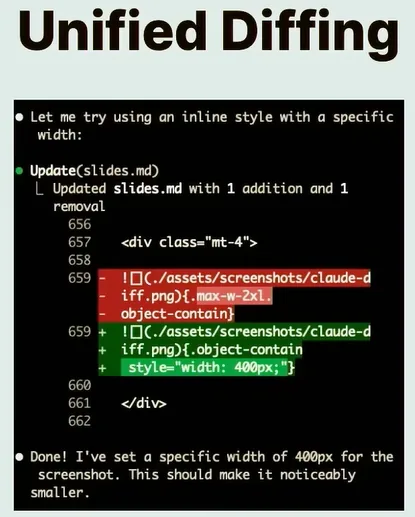
The supplied screenshot shows an agent changing one line in slides.md. The old Markdown image uses a utility class to limit its width. The replacement uses an inline style with a fixed width of 400 pixels.
The important signal is not the final message saying “Done”. It is the patch above it:
- {.max-w-2xl .object-contain}+ {.object-contain style="width: 400px;"}That small block answers four useful questions immediately:
- Where? Inside slides.md, around the shown line numbers.
- What left? The .max-w-2xl class.
- What arrived? An inline width: 400px declaration.
- How broad was the edit? One line removed and one line added.
It does not prove that 400 pixels is the right responsive choice. It does prove what the agent changed. That distinction is the foundation of reliable agent-assisted development.
What unified diffing actually is
A diff compares two versions of text. The unified format places removals and additions in one inline block instead of showing complete files side by side. It keeps only the changed lines plus a small amount of nearby context, which makes it compact enough for terminals, pull requests, patch files, and agent interfaces.
Traditional unified output starts with two file-header lines. The old file is prefixed with ---; the new file is prefixed with +++. One or more hunks follow. Each hunk represents a region where the versions differ. \[1\]
Git adds its own extended header, commonly diff --git a/file b/file, and may include object identifiers, file modes, renames, or copy information. Patch-producing Git commands use this extended format because code changes can involve more than line content. \[2\]
Read the five signals in order
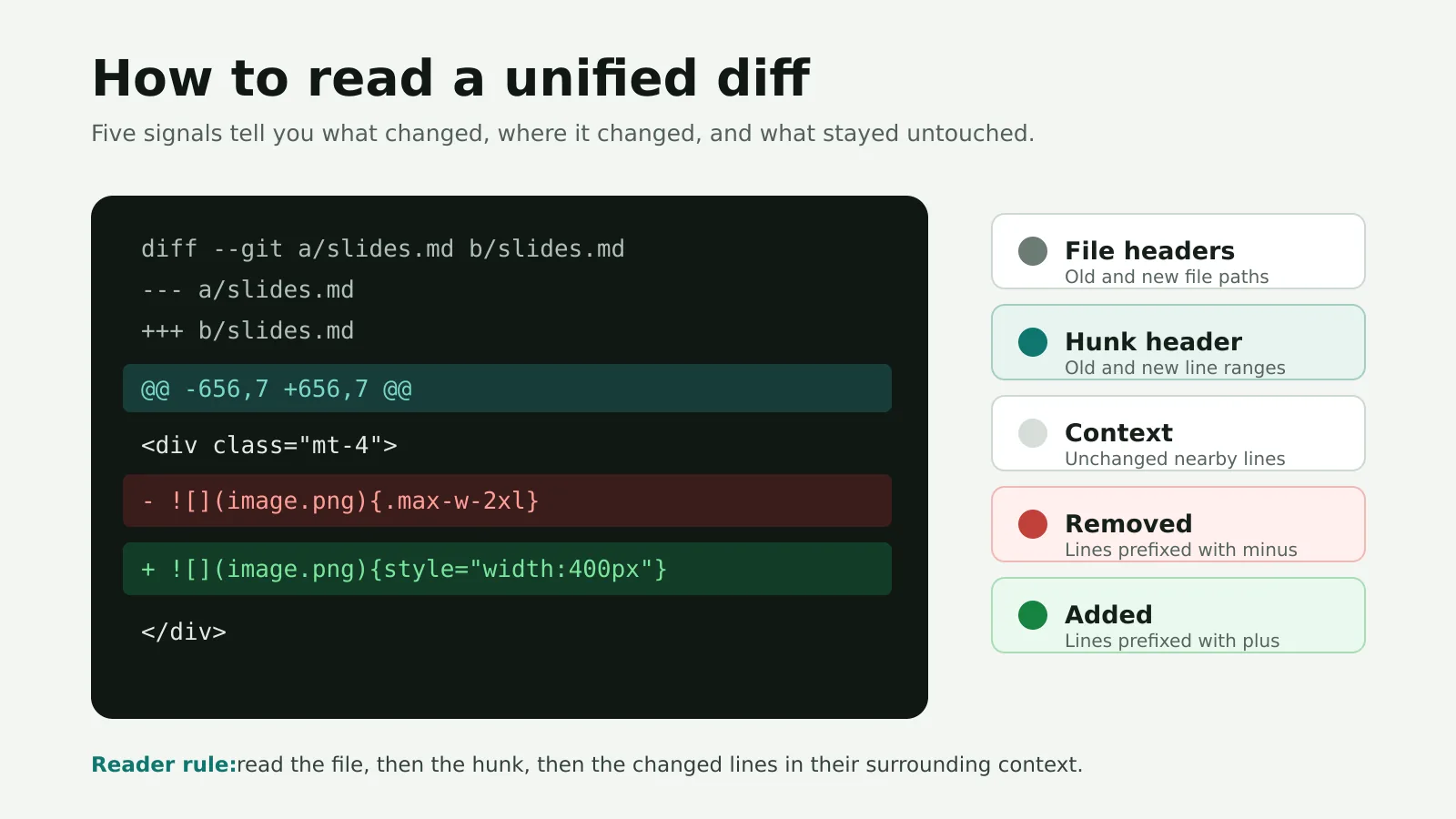
diff --git a/slides.md b/slides.md--- a/slides.md+++ b/slides.md@@ -656,7 +656,7 @@<div class="mt-4">- {.max-w-2xl}+ {style="width: 400px;"}</div>1. Git header: identifies the old and new paths. 2. File headers: --- points to the previous version; +++ points to the proposed version. 3. Hunk header: @@ -656,7 +656,7 @@ describes the starting line and span in each version. 4. Context: lines beginning with a space are unchanged. They help you place the edit. 5. Change lines: - removes content; + adds content.
The hunk header looks dense, but it is mechanical. -656,7 means the old block starts near line 656 and covers seven lines. +656,7 describes the corresponding range in the new version. When a range contains a single line, the count may be omitted.
Why AI coding agents work well with unified diffs
An agent frequently needs to make a narrow change inside a much larger file. Sending or reviewing the entire rewritten file would bury the useful information. A diff reduces the review surface to the intended delta.
That creates three practical advantages.
1. The scope becomes visible
A request might be “make this screenshot smaller”, but the agent could touch a shared component, a global stylesheet, or several unrelated files. The list of changed paths and hunks makes that expansion visible before you accept it.
2. The patch can be applied and checked
A unified patch is structured enough for tooling. Git can read a patch and test whether it applies to the current working tree without changing files by using git apply --check. Git describes this option as an applicability and error check, not a behaviour test. \[3\]
3. The review stays focused on intent
The reviewer can compare the request directly with the delta. If the task is to change width, a one-line styling edit is easy to reason about. If the patch also renames variables or reformats the file, the extra work is visible as noise or scope creep.
| Review dimension | Full-file rewrite | Unified diff |
|---|---|---|
| Signal-to-noise | Low in large files | High around changed regions |
| Unintended edits | Easy to miss | Usually exposed as extra hunks |
| Machine application | Requires replacement logic | Supported by patch tooling |
| Context | Complete, but overwhelming | Local and targeted |
| Best use | Small files or final-state inspection | Incremental edits and code review |
The full file still matters when you need architectural context. The diff is the first lens, not the only lens.
A practical way to review an agent-generated diff
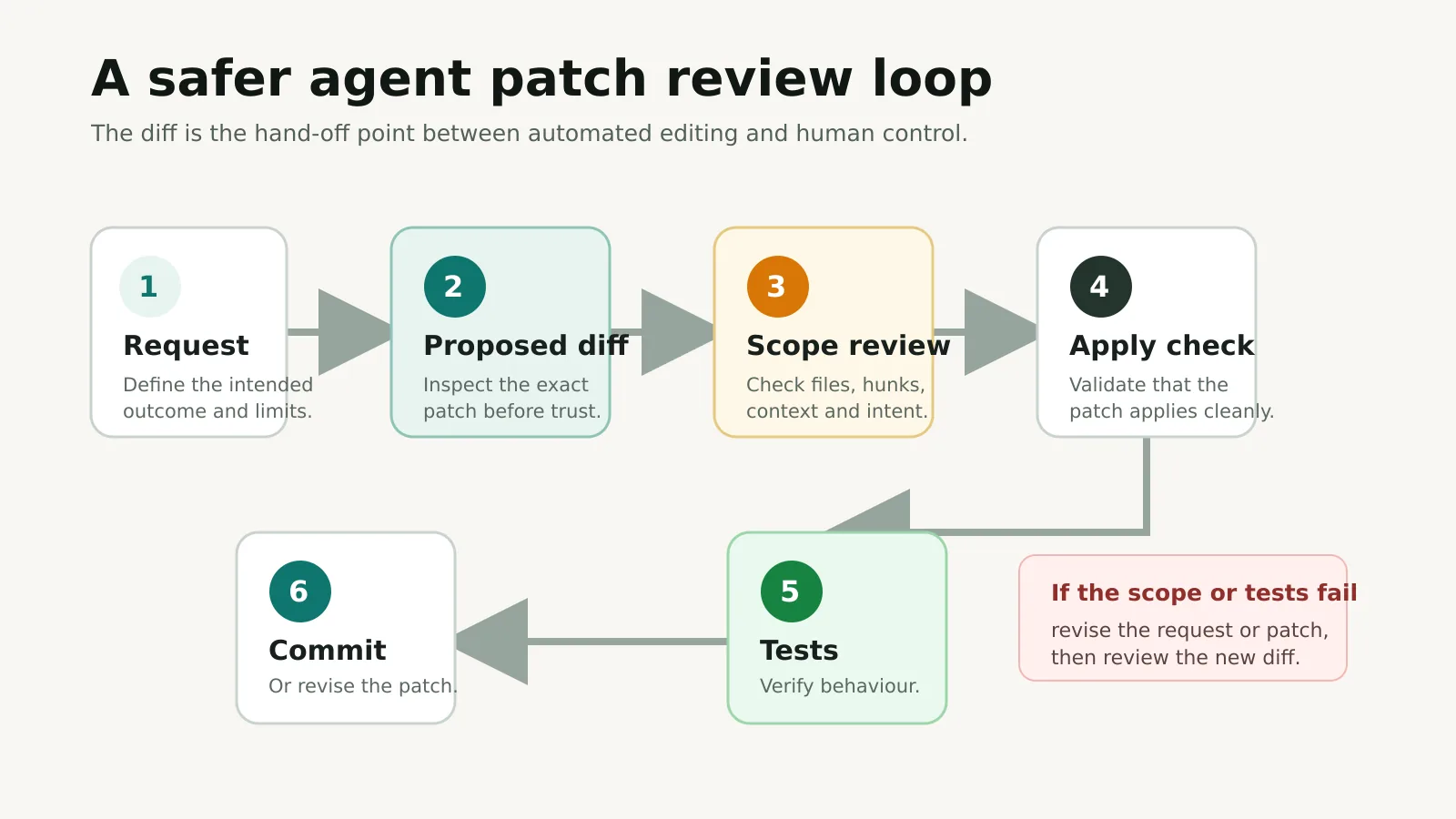
The safest workflow separates “the patch applies” from “the change is correct”. Use the diff to verify scope and implementation, then use automated checks to verify behaviour.
Step 1: Restate the intended outcome
Write the smallest testable version of the request. For the screenshot example: “Render this image at a visibly smaller width without changing other slide content.”
This gives the review a target. Without it, almost any plausible edit can look acceptable.
Step 2: Inspect the changed paths
Check every file before reading individual lines. Ask:
- Does each file belong to this task?
- Is a shared or generated file being changed unnecessarily?
- Is a lockfile change expected?
- Did the agent omit a test or documentation file that should change
with the code?
Unexpected files are a reason to pause, not something to skim past.
Step 3: Read each hunk as a small argument
For every hunk, compare the removed line, added line, and surrounding context. The new code should explain how it satisfies the request. If you cannot connect the hunk to the outcome, ask the agent to justify or remove it.
Watch for broad formatting churn. A one-line feature buried inside 200 reformatted lines is harder to audit and more likely to collide with another branch.
Step 4: Check the semantic consequences
Line-level precision does not guarantee design quality. In the screenshot example, width: 400px is explicit, but a fixed width can overflow a narrow container unless the rendering system constrains it. The right follow-up might be a responsive rule such as max-width: 100% alongside the desired width.
The correct question is not merely “Did the line change?” It is “What will the new line do in every relevant state?”
Step 5: Validate, test, then commit
Run the cheapest checks first:
git apply --check change.patchgit diff --checkThen run the formatter, linter, type checker, unit tests, and a focused manual check where relevant. Review the final git diff again after automated tools run, since a formatter or code generator may add changes of its own.
What unified diffing cannot prove
A diff is evidence of change, not evidence of correctness.
It cannot tell you whether a requirement was misunderstood, whether a fixed width breaks on mobile, whether an API call is secure, or whether the edited code is the right architectural layer. It also provides only limited nearby context. A hunk can look reasonable while depending on code elsewhere in the file or repository.
Diffs are also line-oriented. Moving a block may appear as one large deletion and one large addition. Generated files, minified assets, notebooks, and binary files can produce patches that are difficult or impossible to review meaningfully in this format.
Finally, colour is a convenience, not the grammar. Accessible review tools must preserve the +, -, file headers, and hunk markers so that meaning does not depend on red and green alone.
Useful commands for day-to-day diff review
Show a normal working-tree diff
| git diff |
|---|
Control the number of context lines
| git diff --unified=5 |
|---|
More context helps when nearby logic matters. Less context produces a smaller patch, but can make an edit harder to judge.
See a summary before reading details
git diff --statgit diff --name-onlyCheck whitespace errors
| git diff --check |
|---|
Check whether a patch applies
| git apply --check change.patch |
|---|
Generate a unified diff in Python
Python’s standard difflib.unified_diff() compares two sequences of strings and yields unified-format delta lines. Its context count defaults to three and can be changed with n. \[4\]
from difflib import unified_diffbefore = ["max-width: 672px;\n"]after = ["width: 400px;\n", "max-width: 100%;\n"]patch = unified_diff( before, after, fromfile="before.css", tofile="after.css", n=3,)print("".join(patch))This is useful for previews, content versioning, audit trails, configuration changes, and tools that need to show a human-readable delta before writing data.
The checklist I would use before accepting a patch
- [ ] The changed files match the request.
- [ ] Every hunk has a clear reason to exist.
- [ ] The context confirms the edit is in the right place.
- [ ] Removed behaviour is intentional.
- [ ] Added behaviour handles relevant states and constraints.
- [ ] Formatting noise and unrelated refactors are absent.
- [ ] The patch applies cleanly.
- [ ] Linting, types, and tests pass.
- [ ] The final diff still matches the original request.
- [ ] The commit message explains the outcome, not just the files.
The takeaway
Unified diffing is one of the simplest ways to keep control when an AI agent edits code. It compresses the work into a reviewable contract: these files, these locations, these removals, these additions.
Read that contract before you trust the completion message. Then validate the code with the same checks you would use for any human-authored change.
If you are designing an AI-assisted engineering workflow and want the agents, permissions, review gates, and testing strategy to work as one system, get in touch.
References
Full-Stack Developer & AI Engineer
Full-stack developer and AI engineer from Kolkata, India. I build AI agents, automations, and full-stack products that hand growing teams back the hours they lose to busywork. Here I write about what worked, what broke, and what I would do differently.
Connect on LinkedIn