Custom AI Agent vs Chatbot: Which Does Your Business Actually Need?
A practical comparison for choosing the smallest conversational system that can solve the real workflow.

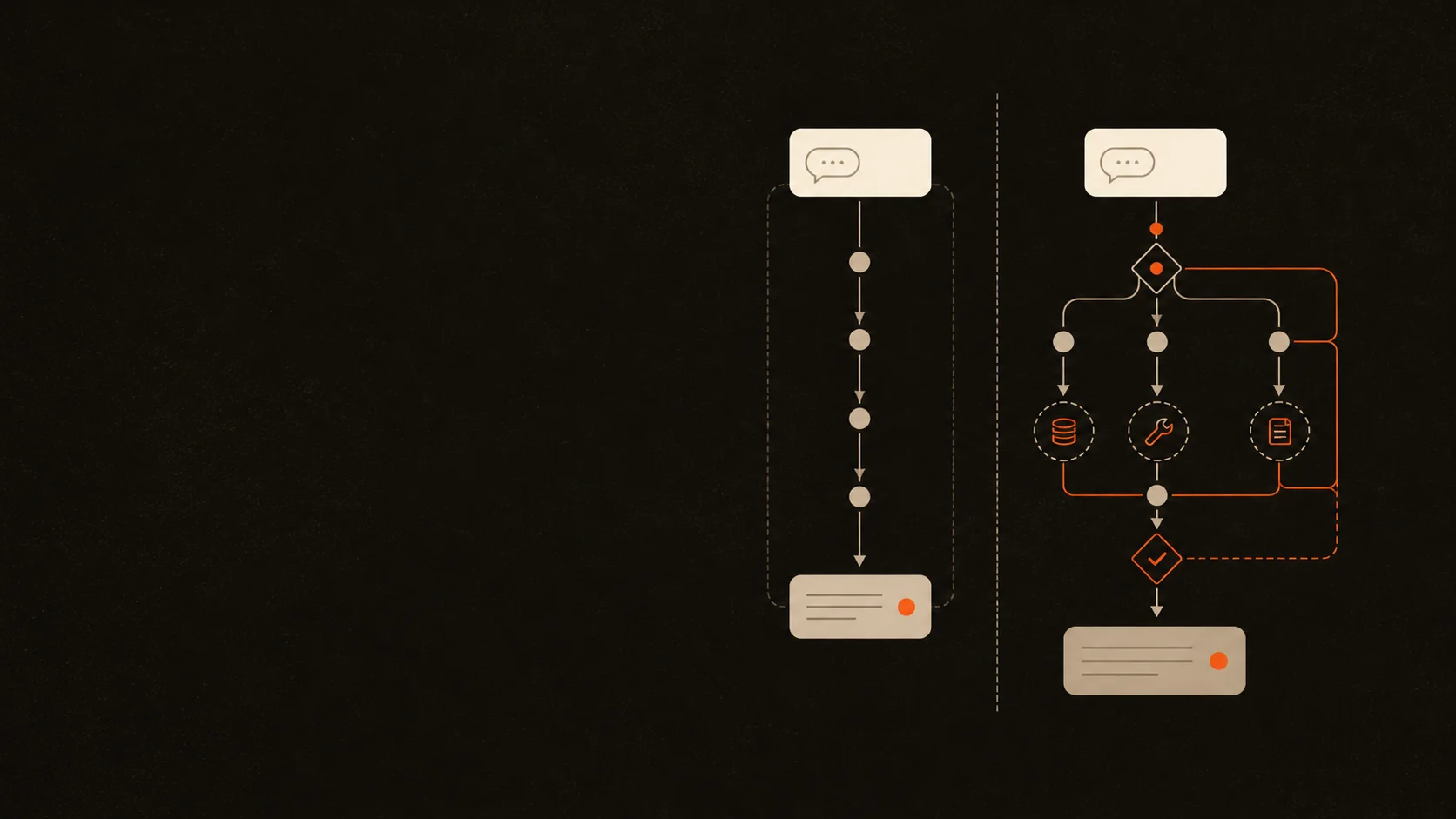
Businesses often ask for a chatbot when they actually need workflow automation. Others ask for an AI agent when a focused chatbot would be cheaper, faster, and easier to control.
The interface does not settle the question. Both systems can appear as the same chat bubble on a website. The difference is what happens behind that interface.
When comparing a custom AI agent vs chatbot, choose a chatbot if the job is mainly to answer approved questions, collect information, and route a conversation along known paths. Choose a custom agent only when the system must decide what to do next, use tools, maintain workflow state, and take bounded actions across several steps.
Custom AI agent vs chatbot: the short answer
A chatbot is usually the right choice when the conversation itself is the product. It answers questions, gathers details, recommends the next page, or hands the user to a person.
A custom AI agent is justified when conversation is only the entry point. The real job continues after the message: inspect context, select a tool, complete a sequence of actions, check the result, and decide whether to continue or escalate.
The comparison is easiest to make by looking at the workflow behind the interface:
- Main purpose: a chatbot holds a useful conversation; a custom agent completes a bounded business workflow.
- Path: a chatbot follows mostly predefined routes; an agent chooses dynamically within explicit limits.
- Knowledge: a chatbot uses FAQs, documents, product, or policy content; an agent combines knowledge with live workflow state.
- Tool use: a chatbot may have no tool or one narrow lookup; an agent may use several approved read or action tools.
- Actions: a chatbot collects, recommends, routes, and hands off; an agent may create, update, schedule, analyse, or coordinate.
- Risk: a chatbot usually risks a poor answer or missed handoff; an agent can affect records, customers, money, or operations.
- Evaluation: a chatbot is judged on answer quality and conversation completion; an agent also needs end-to-end task, tool, policy, and recovery checks.
- Typical build: a chatbot is smaller and easier to maintain; an agent needs more integration, testing, monitoring, and governance.
This is not a hierarchy. An agent is not automatically better. It carries more capability and therefore needs more control.
OpenAI's practical guide to building agents distinguishes agents from LLM applications that do not let the model control workflow execution. It describes an agent as a system that manages a workflow, selects tools, checks progress, and can halt or return control to a person [1].

What I mean by a chatbot
The word “chatbot” covers several levels of capability. I separate them by what the system is allowed to do.
Scripted chatbot
A scripted chatbot follows a decision tree. It can show buttons, collect contact details, ask a fixed sequence of questions, and route the user based on selected answers.
This is a good fit when the business process is stable and the available choices are known. There is little reason to add model-driven decision-making if a predictable flow already solves the problem.
Grounded AI chatbot
A grounded chatbot uses an LLM to understand natural language and answer from approved business content. Retrieval can bring relevant passages from policies, services, or product documents into the response.
The model provides flexible language. The application still controls the workflow. It decides which sources are available, when to request contact details, when to refuse, and when to hand off.
Tool-assisted chatbot
A chatbot may also use one tightly constrained tool, such as checking appointment availability or looking up an order status. That does not automatically make the whole product an autonomous agent.
I still treat it as a chatbot when the application calls the tool at a known point and the model is not deciding how to execute a broader workflow.
What changes when it becomes a custom AI agent
A custom agent has responsibility for part of the process, not only the conversation.
It may:
- interpret a goal from an open-ended request;
- decide which information is missing;
- select from several approved tools;
- plan or revise the next step using tool results;
- maintain state across a multi-step task;
- stop when a success condition is met;
- pause for human approval or hand off when it reaches a boundary.
Anthropic's guidance on building effective agents draws a useful architectural distinction. A workflow follows code paths defined in advance. An agent dynamically directs its own process and tool use. Its guidance also recommends starting with the simplest solution and adding complexity only when the outcome improves enough to justify the extra cost and latency [2].

Choose a chatbot when the conversation is the job
I would start with a chatbot when most of these statements are true:
- The main need is to answer recurring questions from approved content.
- The conversation follows a small number of predictable routes.
- The system collects details but a person completes the work.
- A wrong answer can be contained through citation, refusal, or handoff.
- The required information changes occasionally, not every hour.
- The business wants a visible, auditable experience rather than autonomous execution.
Good examples include:
- an FAQ assistant for services, policies, locations, and opening hours;
- a lead-capture bot that asks qualifying questions and sends the result to a team;
- a product-finder that recommends from a controlled catalogue;
- a support assistant that retrieves approved troubleshooting steps;
- an appointment enquiry flow that collects details before staff confirm the booking.
In these cases, a focused chatbot is usually easier to evaluate. You can test whether it used the right source, answered accurately, collected required fields, and handed off at the correct point.
Choose a custom AI agent when the workflow is the job
An agent becomes useful when the next step depends on context and the system must act on the result.
I would consider one when:
- the task spans several systems or tools;
- the order of steps changes by case;
- inputs are unstructured or incomplete;
- the system must inspect results before choosing the next action;
- a person currently spends time coordinating the workflow rather than simply answering questions;
- success can be defined and checked at the end of the task;
- permissions, approvals, retry limits, and handoff rules can be made explicit.
Examples include:
- reviewing an inbound lead, enriching the company record, scoring fit, drafting outreach, and updating the CRM;
- reading a support request, checking the account and order, proposing a resolution, updating the ticket, and escalating exceptions;
- researching a topic across approved sources, producing a structured report, validating required sections, and requesting missing evidence;
- coordinating appointment availability, collecting required details, booking a slot, sending confirmation, and recording the outcome.
The word “custom” matters because these workflows depend on a business's own systems, policies, permissions, data model, and definition of done. The model is one component. The product also needs application logic, tool interfaces, authentication, state, logging, evaluations, and recovery behaviour.
The hybrid option is usually the best starting point
Many useful products sit between a basic chatbot and an open-ended agent.
GetParlix is a useful example from my own product work. The user sees a conversational assistant, but the product is designed around a bounded business outcome. It can answer from uploaded business information, collect booking details, check availability, prevent double-booking, send confirmations, and hand the conversation to a person when needed.
I would not describe every turn as autonomous. The reliable design comes from keeping deterministic controls around high-value facts and actions. The model handles natural language and chooses within a narrow workflow. The application owns permissions, booking rules, validation, and handoff.
That hybrid pattern often gives a business most of the value it expects from an “agent” without granting broad freedom on day one.

The hidden cost is not the chat interface
The conversation UI is often the simplest part of either build. The cost difference appears behind it.
Knowledge and data
A chatbot needs clean source content and a way to retrieve it. An agent also needs live operational data, well-defined tool inputs, stable identifiers, and rules for conflicting information.
Integrations and permissions
A chatbot may read documents. An agent may read and change business systems. Each action needs authentication, authorisation, parameter validation, audit logs, and least-privilege access.
Failure recovery
A poor chatbot response can often be corrected in the conversation. A poor agent decision may create a duplicate booking, send the wrong message, change a record, or trigger several downstream actions.
That requires idempotency, retry limits, approval checkpoints, safe stopping conditions, and a clear owner for exceptions.
OWASP's agentic AI guidance warns that excessive agency can turn one mistaken decision into changes across multiple connected systems. It recommends decomposing high-impact operations, using minimal credentials, favouring reversible actions, and requiring confirmation before irreversible changes [3].
Evaluation and operations
For a chatbot, I test answer accuracy, source use, refusal behaviour, lead capture, and handoff. For an agent, I also test every tool call, state transition, permission boundary, recovery path, and final business outcome.
NIST's Generative AI Profile treats risk management as ongoing work across design, development, deployment, use, and evaluation [4]. That lifecycle view matters more as the system gains access and autonomy.
A decision test for your business
Before choosing either system, write down the workflow and answer these questions:
- What exact outcome should the system produce? If the answer is only “talk to customers,” define the conversation's purpose.
- Does the path change by case? If the steps are stable, a scripted or grounded chatbot may be enough.
- Must it use live tools? Separate read-only lookups from actions that change state.
- Who owns the result? Every automated workflow needs an operational owner.
- What is the worst plausible mistake? Record whether it is reversible and who would be affected.
- Where must a person approve or take over? Put the checkpoint before the high-impact action.
- How will success be tested? Use representative cases and observable pass conditions.
- Can the first version do less? Remove tools, permissions, and branches until only the essential workflow remains.
If the useful outcome ends after the answer or handoff, build the chatbot. If the useful outcome requires several context-dependent actions, prototype a bounded agent. If only one action is needed, a hybrid assistant may be the better design.
Red flags that should stop an agent build
I would pause the project when:
- nobody can define the workflow or the final outcome;
- policies conflict and no owner can resolve them;
- the first release needs broad permission to send, delete, publish, pay, or modify records;
- there is no representative test set;
- success depends on subjective impressions of whether the agent “seems smart”;
- the process changes faster than the team can maintain instructions and integrations;
- a simple form, search feature, or deterministic automation already solves the job.
These do not always kill the idea. They usually mean the scope needs to shrink before development starts.
Frequently asked questions
Is an AI agent just a more advanced chatbot?
No. A chatbot is a conversational interface. An agent is a system that controls part of a workflow, selects tools or steps, observes results, and works toward a defined outcome. A product can use chat as the interface for either architecture.
Can a chatbot book appointments or update a CRM?
Yes. A chatbot can call a narrow tool at a predefined point. It becomes more agent-like when the model decides which actions to take, in what order, and whether the workflow is complete.
Is a custom AI agent more expensive than a chatbot?
Usually. The agent needs more integrations, permissions, workflow state, evaluations, monitoring, and failure recovery. The real cost depends on the number of tools, the impact of actions, data quality, and how much human review remains.
Should a small business start with a chatbot or an AI agent?
Start with the smallest system that produces value. For most first projects, that is a grounded chatbot or a tool-assisted assistant with one controlled action. Add broader agent behaviour only after the narrow workflow is measured and reliable.
Build the capability the workflow requires
The right choice is not based on which term sounds more advanced. It is based on where the useful work ends.
If the business needs accurate answers, structured lead capture, and a clean handoff, a chatbot is probably enough. If it needs a system to coordinate several context-dependent steps across tools, a custom agent may be justified.
I prefer to start one level lower than the initial request. Prove the knowledge, conversation, tool, and evaluation separately. Then add autonomy where it removes real coordination work without removing control.
If you have a workflow in mind, send me the process. I will tell you honestly whether it needs a chatbot, a bounded agent, or simpler automation.
References
- 01OpenAI, A practical guide to building agents, accessed August 17, 2026.
- 02Anthropic, Building effective agents, published December 19, 2024, accessed August 17, 2026.
- 03OWASP GenAI Security Project, LLM06:2025 Excessive Agency, accessed August 17, 2026.
- 04NIST, Artificial Intelligence Risk Management Framework: Generative Artificial Intelligence Profile, updated April 8, 2026, accessed August 17, 2026.
Full-Stack Developer & AI Engineer
Full-stack developer and AI engineer from Kolkata, India. I build AI agents, automations, and full-stack products that hand growing teams back the hours they lose to busywork. Here I write about what worked, what broke, and what I would do differently.
Connect on LinkedIn